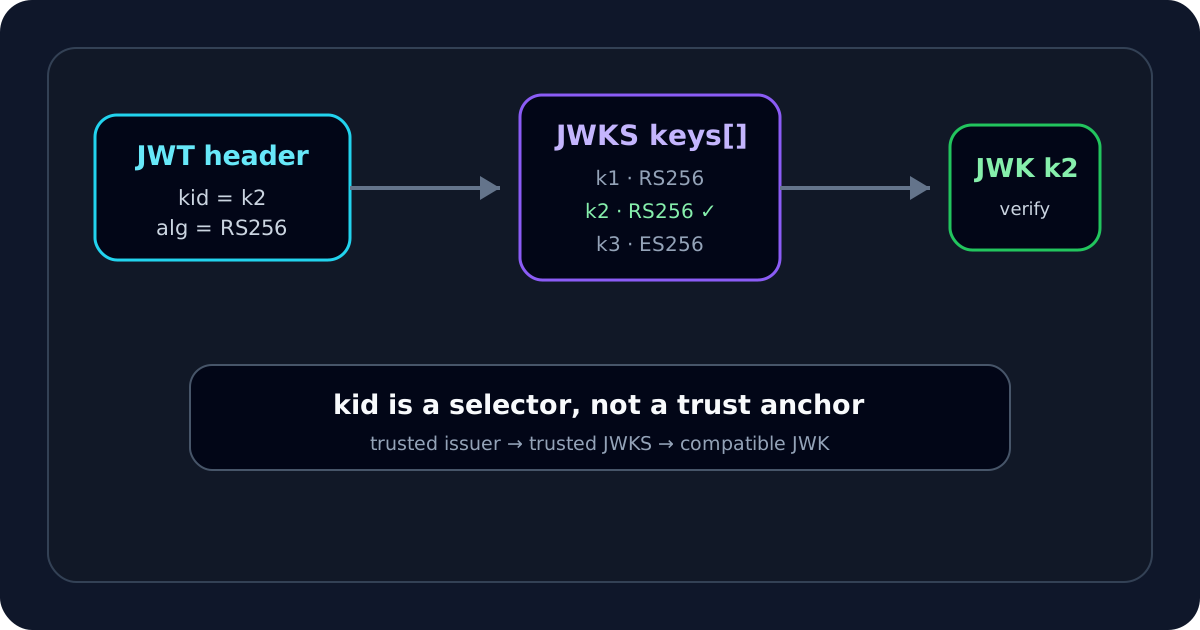
When I see a JWT fail with an error such as kid not found, unknown key ID, or signature verification failed after key rotation, I start with the token header rather than the payload. The value I care about is usually kid — the key identifier the verifier can use to select one key from a trusted JWK Set.
My goal is not to make the token verify at any cost. My goal is to prove that I selected the correct key from the correct issuer-controlled key set, using an algorithm my application is actually configured to trust.
If I already have the JWT and JWKS, I use the JWKS Validator first. It shows the token's alg, kid and iss, matches the key inside the supplied JWKS and verifies the signature locally in the browser.
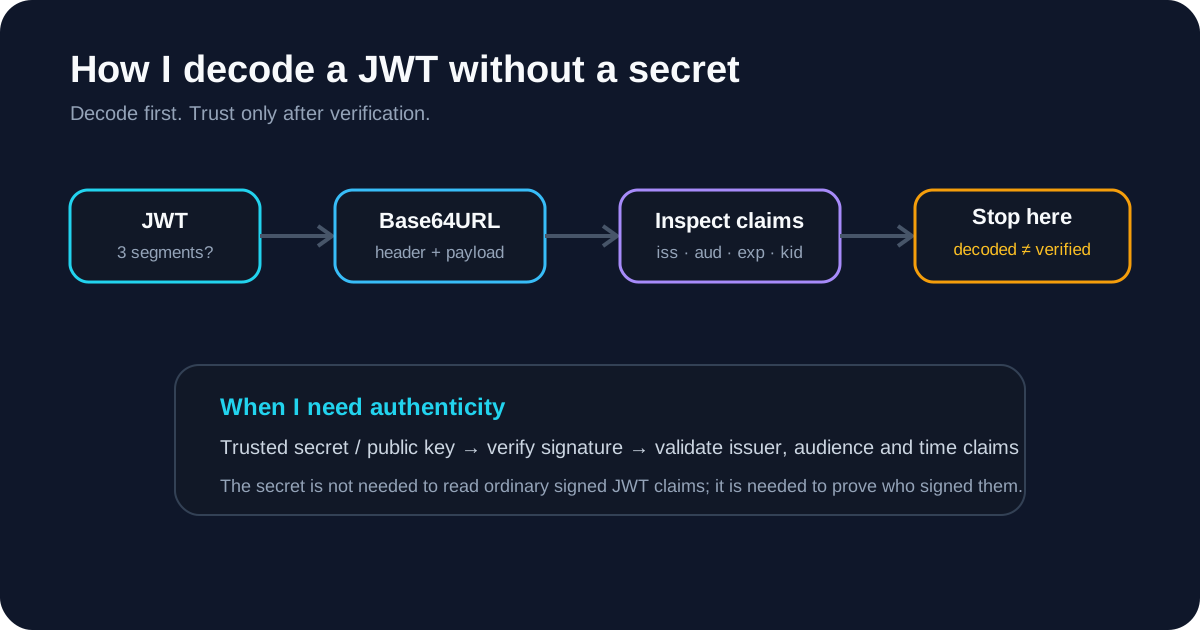
Step 1: I decode the header and read kid
I start with the JWT Decoder and look at the protected header:
{
  "alg": "RS256",
  "typ": "JWT",
  "kid": "2026-09-key-03"
}
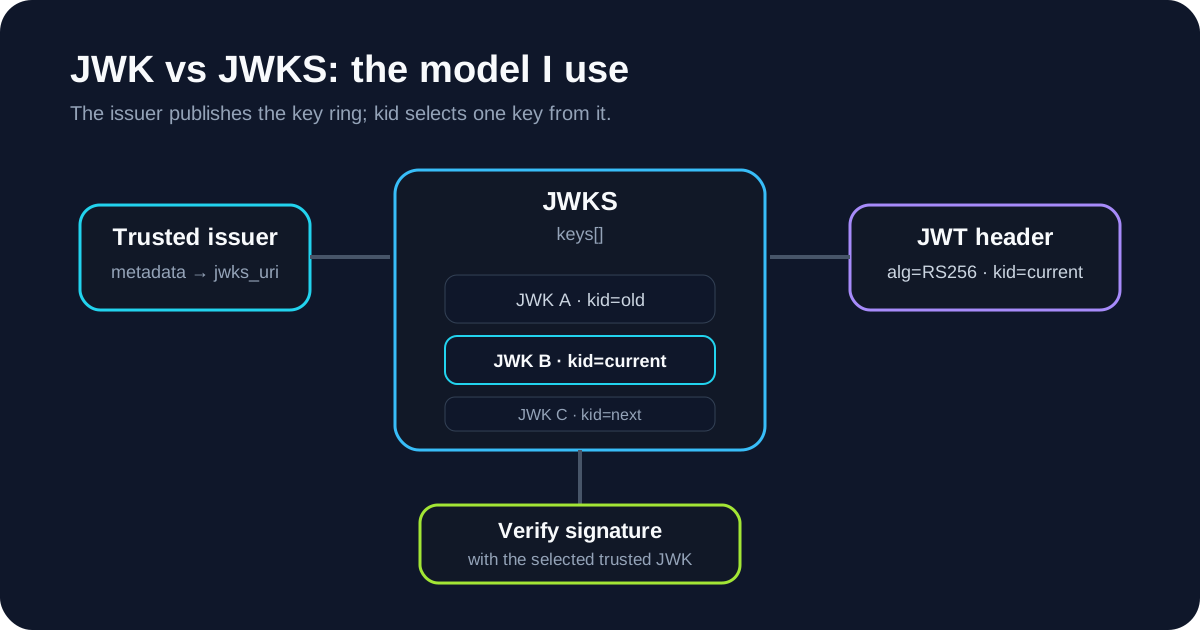
RFC 7515 defines kid as a Key ID header parameter. RFC 7517 also defines kid for JWKs and describes it as a way to match a specific key, including during key rollover.
The important thing I keep in mind is that kid is only a selection hint. It does not make the selected key trusted.
A token can claim any kid value it wants. I still need to know which issuer I trust and which JWKS belongs to that issuer.
Step 2: I inspect the trusted JWKS, not an arbitrary key source
A JWK Set normally looks like this:
{
  "keys": [
    {
      "kty": "RSA",
      "kid": "2026-09-key-03",
      "use": "sig",
      "alg": "RS256",
      "n": "...",
      "e": "AQAB"
    },
    {
      "kty": "RSA",
      "kid": "2026-06-key-02",
      "use": "sig",
      "alg": "RS256",
      "n": "...",
      "e": "AQAB"
    }
  ]
}
I compare the JWT header kid with the JWK kid values in the key set that my application is configured to trust.
I do not start by searching the web for a matching key ID. A key ID is not globally unique, and finding a public key with the same label somewhere else does not establish trust.
In OAuth or OpenID-style deployments, the trusted JWKS location is commonly tied to trusted issuer metadata. RFC 8414 defines jwks_uri as the URL for the authorization server's JWK Set. The trust path matters:
configured issuer
      ↓
trusted metadata
      ↓
trusted jwks_uri
      ↓
JWK Set
      ↓
kid match
That order is much safer than:
untrusted token
      ↓
random URL from token/header
      ↓
accept whatever key appears there
Step 3: if kid is missing, I check whether key selection is still unambiguous
Not every signed JWT is required to contain kid.
If the trusted JWKS contains exactly one compatible signing key, a verifier may still have enough information to select it according to its own policy.
But if the JWKS contains multiple compatible keys and the token has no kid, I treat selection as ambiguous unless the application has another deterministic rule.
For example:
{
  "keys": [
    { "kty": "RSA", "kid": "key-a", "alg": "RS256" },
    { "kty": "RSA", "kid": "key-b", "alg": "RS256" }
  ]
}
with a JWT header containing only:
{
  "alg": "RS256"
}
is not a situation where I want the verifier to "try keys until something works" without a clear policy.
The JWKS Validator follows the same conservative rule: if there is no kid and more than one compatible key remains, it reports ambiguous key selection.
Step 4: I check alg, kty, use and key_ops
A matching kid is not the end of the check.
I also inspect fields such as:
- JWT header
alg; - JWK
kty; - JWK
alg, when present; - JWK
use, when present; - JWK
key_ops, when present.
For example, an RS256 JWT should use an RSA verification key. An ES256 JWT should use an EC key on P-256. If a JWK explicitly says it is for encryption rather than signatures, I do not use it to verify a JWS.
RFC 8725 requires applications to restrict supported algorithms rather than blindly accepting whatever alg appears in the token.
That means my application starts with an allowlist such as:
allowed JWT algorithms = [RS256]
not:
allowed JWT algorithm = whatever the token says
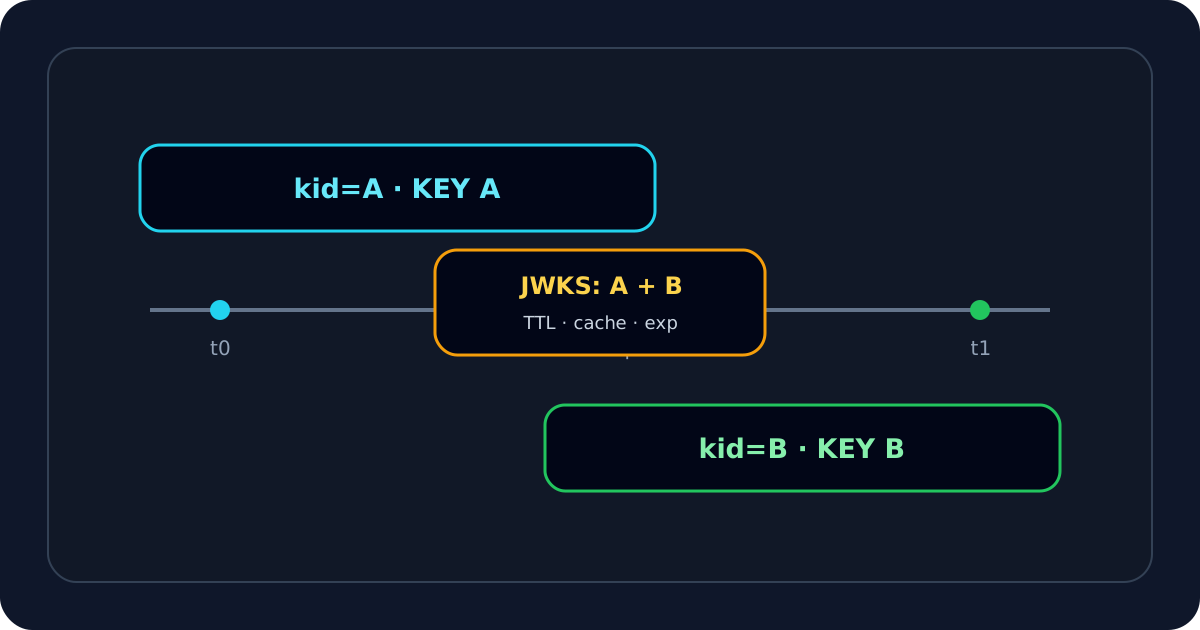
Step 5: if kid is not found, I check key rotation
One of the most common causes I look for is key rotation.
A typical sequence is:
issuer publishes key A
      ↓
tokens signed with key A
      ↓
issuer introduces key B
      ↓
new tokens use kid B
      ↓
verifier still has stale JWKS containing only A
The result can be:
kid B not found
or a generic signature failure.
When that happens, I check:
- whether the issuer currently publishes the new
kid; - whether my verifier caches JWKS;
- how long that cache lives;
- whether failed key lookup triggers an appropriate refresh;
- whether I am accidentally querying a dev/old tenant JWKS instead of production.
I avoid "fixing" rotation by disabling key caching entirely. A production verifier normally needs a controlled refresh strategy rather than a network call for every request.
Step 6: I check whether I mixed environments or tenants
A kid mismatch is often really an issuer/configuration mismatch.
For example:
JWT iss:  https://login.dev.example.com/
API trusts: https://login.example.com/
The development and production issuers can publish completely different key sets even when their JWT shape looks identical.
Likewise, multi-tenant identity providers may use different JWKS or different keys by tenant.
So when I see:
kid not found
I do not ask only:
Where is this key?
I also ask:
Is this token even from the issuer/environment I meant to trust?
That is why I pair kid debugging with JWT issuer validation.
Step 7: I do not automatically trust jku or x5u
Some JOSE headers can carry URLs such as jku or x5u.
I treat those values as untrusted input unless my application has an explicit policy that constrains them.
RFC 8725 warns that blindly following token-provided URLs can lead to SSRF-style problems and other trust failures. A malicious token should not get to say:
"Please fetch my verification key from this arbitrary server I control."
and then have the application automatically trust that key.
The JWKS Validator intentionally does not auto-follow jku or x5u. It only fetches a JWKS URL that I explicitly enter.
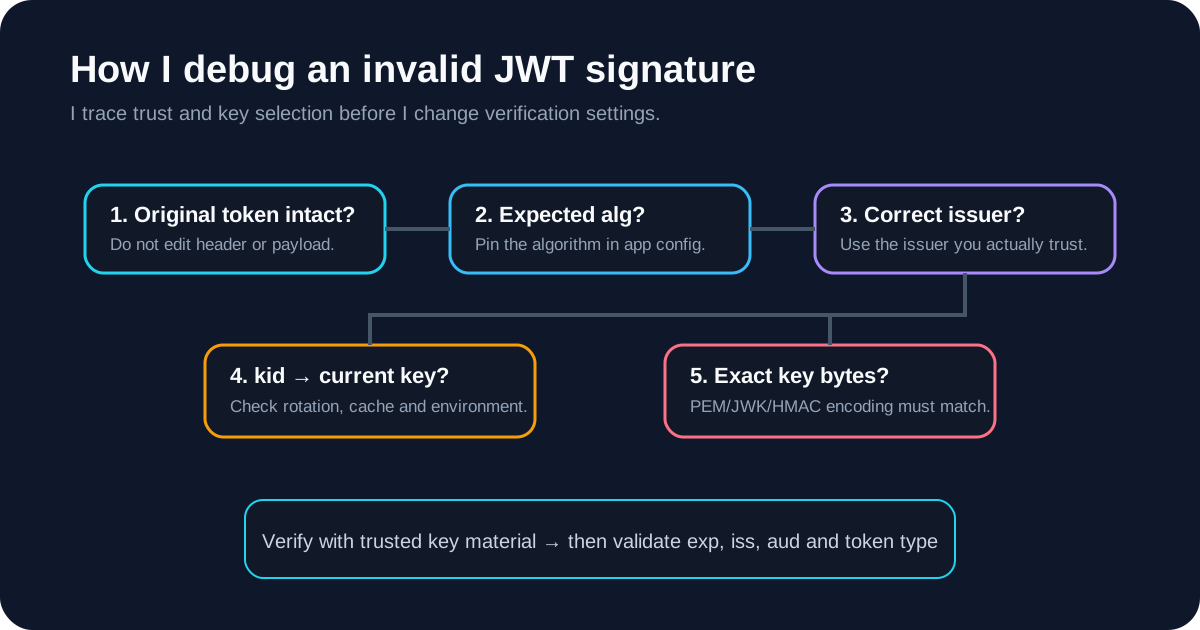
Step 8: I distinguish "kid matched" from "signature verified"
Even after I select a JWK with the right kid, I still have to perform the cryptographic verification.
A key-selection result should look conceptually like:
kid found            ✓
algorithm compatible ✓
key intended for sig ✓
signature verified   ✓ / ✕
If the first three pass but the signature still fails, I move to the JWT invalid signature guide.
Possible causes include:
- stale or wrong key material;
- token corruption;
- wrong issuer;
- wrong algorithm policy;
- incorrect EC/RSA key handling;
- a token signed by a key that is no longer in the active trusted set.
Step 9: after the signature passes, I still validate claims
A successful JWKS signature check is not the same as accepting the JWT.
I still check:
iss;aud;exp;nbf;- token type/profile;
- scopes or roles required by the API.
This matters because one issuer can sign tokens for multiple APIs or multiple token types.
A cryptographically valid token can still be wrong for the resource server receiving it.
My kid debugging checklist
When I need to diagnose JWT key selection quickly, I use this order:
- I decode the JWT and read
alg,kidandiss. - I identify the issuer my application is configured to trust.
- I obtain the JWKS from that trusted issuer configuration.
- I search the JWKS for an exact
kidmatch. - I check
kty,alg,useandkey_opscompatibility. - If the key is missing, I investigate rotation and JWKS caching.
- I check for dev/prod or tenant mix-ups.
- I never trust an arbitrary token-controlled key URL by default.
- I verify the signature with the selected JWK.
- I validate issuer, audience and time claims after cryptographic verification.
The key idea I use throughout this process is simple: kid helps me find a key; it does not tell me whether that key should be trusted. Trust comes from the configured issuer and key-discovery policy around the token, not from the token header by itself.